Create a Package by right-clicking on the Package (i.e. the top-left) pane of the Package Browser.
Where traditionally Smalltalk had "Categories" in the left-most pane - a agglomeration of related classes - Pharo has "Packages". Packages
A Package is a collection of related classes and
extension methods that may be versioned using the Monticello versioning tool.
By convention, package names and category names are the same. The distinction is only a difference once you use the Monticello versioning tool.
Create a new Package's first class by typing over the pro-forma code in the codepane.
The first line is an instruction to the package to create a class that has the same name as the symbol string used as the keyword argument.
The instance variable names use actual strings.
The category argument comes pre-filled from the create package dialogue.
Right-click on the pane and "accept", or alt-s (which originally stood for 'save' rather than accept)
-----
The Pharo screen has a co-ordinate system with 0,0 as the top-left.
The x-co-ord increases rightwards, and the y co-ord increases as you go downwards.
-----
The bottom-right pane of the object Inspector window is a codepane.
-----
In the protocols pane of the System Browser, protocols are called categories in the drop-down action menu.
-----
You can drag and drop methods to new classes, methods to new protocols
-----
Saturday, 24 October 2015

Friday, 23 October 2015
Pharo By Example, Ch. 3
Compile-time arrays are defined by #( ), surrounding space-separated literals.
Everything within the parentheses must be a compile-time constant.
For example, #(27 (true false) abc) is a literal array of three elements: the
integer 27, the compile-time array containing the two booleans, and the
symbol #abc. (Note that this is the same as #(27 #(true false) #abc).)
i.e. Compile-time arrays must contain unique objects - symbols or constants
Only run-time arrays can contain object instances like strings.
Run-time arrays. Curly braces { } define a (dynamic) array at run-time. Elements are expressions separated by periods. So { 1. 2. 1+2 } defines an array with elements 1, 2, and the result of evaluating 1+2.
The curlybrace notation is peculiar to the Pharo and Squeak dialects of Smalltalk! In other Smalltalks you must build up dynamic arrays explicitly.
How do you build up dynamic arrays explicitly?
-----
Local variable definitions. Vertical bars | | enclose the declaration of one or more local variables in a method (and also in a block).
-----
There are 6 reserved keywords, or pseudo-variables: nil, true, false, self, super, and thisContext.
You cannot assign a value to a pseudovariable.
self - the receiver of the currently executing method
super - the superclass of the receiver
(technically, the receiver, but doing method-lookup starting from the receiver's superclass)
nil - the undefined object. It is the unique instance of the class UndefinedObject. Instance variables, class variables and local variables are initialized to nil.
thisContext is a pseudo-variable that represents the top frame of the runtime stack. In other words, it represents the currently executing MethodContext or BlockClosure. thisContext is normally not of interest to most programmers, Message sends 53 but it is essential for implementing development tools like the debugger and it is also used to implement exception handling and continuations.
true and false are the unique instances of the Boolean classes True and False.
-----
Blocks
Code contained between [ and ]
They return the value of the last evaluated expression. (unless there is an explicit return (with ^), in which case it does not answer a value)
Blocks may take parameters. Each parameter is declared with a leading colon.
A vertical bar separates the parameter declaration(s) from the body of the block.
For a block with one parameter, you must send it the message value: with one argument.
For a block with two parameters, you must send it the message value:value:, each with one argument. with two argument.
For a block with three parameters, you must send it the message value:value:value:, each with one argument.
For a block with four parameters, you must send it the message value:value:value:value:, each with one argument.
For a block with more than four parameters, you must send it the message valueWithArguments: and pass the arguments in an array.
A block with a large array of parameters is often the sign of a design issue.
Blocks may also declare local variables, which are surrounded by vertical bars, just like local variable declarations in a method. Locals are declared after any arguments, e.g.
[ :x :y | | z | z := x+ y. z ] value: 1 value: 2
→ 3
Blocks are instances of the class BlockClosure. This means that they are objects, so they can be assigned to variables and passed as arguments just like any other object.
-----
Loops and controls
control constructs are typically expressed by sending messages to booleans, numbers and collections, with blocks as arguments.
(condition)
ifTrue: [ ]
ifFalse: [ ]
[ ] whileTrue: [ ]
[ ] whileFalse: [ ]
nn timesRepeat: [ ]
Iterators
(nn to: nn) do: [ :x | result := result, x printString, ' ' ]
(nn: to nn2:) is a collection - a dynamic array
1 to 10 would give
result -> '1 2 3 4 5 6 7 8 9 10'
= has the same value as
== exactly equal to
(or else it's == and === )
[ n < 1000 ] whileTrue: [ n := n* 2 ].
collect:
builds a new collection of the same size, transforming each element.
(1 to: 10) collect: [ :each | each * each ]
-> #(1 4 9 16 25 36 49 64 81 100)
select: and reject:
build subset collections
detect:
returns the first element matching the condition
-----
i.e. Compile-time arrays must contain unique objects - symbols or constants
Only run-time arrays can contain object instances like strings.
Run-time arrays. Curly braces { } define a (dynamic) array at run-time. Elements are expressions separated by periods. So { 1. 2. 1+2 } defines an array with elements 1, 2, and the result of evaluating 1+2.
The curlybrace notation is peculiar to the Pharo and Squeak dialects of Smalltalk! In other Smalltalks you must build up dynamic arrays explicitly.
How do you build up dynamic arrays explicitly?
-----
Local variable definitions. Vertical bars | | enclose the declaration of one or more local variables in a method (and also in a block).
-----
There are 6 reserved keywords, or pseudo-variables: nil, true, false, self, super, and thisContext.
You cannot assign a value to a pseudovariable.
self - the receiver of the currently executing method
super - the superclass of the receiver
(technically, the receiver, but doing method-lookup starting from the receiver's superclass)
nil - the undefined object. It is the unique instance of the class UndefinedObject. Instance variables, class variables and local variables are initialized to nil.
thisContext is a pseudo-variable that represents the top frame of the runtime stack. In other words, it represents the currently executing MethodContext or BlockClosure. thisContext is normally not of interest to most programmers, Message sends 53 but it is essential for implementing development tools like the debugger and it is also used to implement exception handling and continuations.
true and false are the unique instances of the Boolean classes True and False.
-----
Blocks
Code contained between [ and ]
They return the value of the last evaluated expression. (unless there is an explicit return (with ^), in which case it does not answer a value)
Blocks may take parameters. Each parameter is declared with a leading colon.
A vertical bar separates the parameter declaration(s) from the body of the block.
For a block with one parameter, you must send it the message value: with one argument.
For a block with two parameters, you must send it the message value:value:, each with one argument. with two argument.
For a block with three parameters, you must send it the message value:value:value:, each with one argument.
For a block with four parameters, you must send it the message value:value:value:value:, each with one argument.
For a block with more than four parameters, you must send it the message valueWithArguments: and pass the arguments in an array.
A block with a large array of parameters is often the sign of a design issue.
Blocks may also declare local variables, which are surrounded by vertical bars, just like local variable declarations in a method. Locals are declared after any arguments, e.g.
[ :x :y | | z | z := x+ y. z ] value: 1 value: 2
→ 3
Blocks are instances of the class BlockClosure. This means that they are objects, so they can be assigned to variables and passed as arguments just like any other object.
-----
Loops and controls
control constructs are typically expressed by sending messages to booleans, numbers and collections, with blocks as arguments.
(condition)
ifTrue: [ ]
ifFalse: [ ]
[ ] whileTrue: [ ]
[ ] whileFalse: [ ]
nn timesRepeat: [ ]
Iterators
(nn to: nn) do: [ :x | result := result, x printString, ' ' ]
(nn: to nn2:) is a collection - a dynamic array
1 to 10 would give
result -> '1 2 3 4 5 6 7 8 9 10'
= has the same value as
== exactly equal to
(or else it's == and === )
[ n < 1000 ] whileTrue: [ n := n* 2 ].
collect:
builds a new collection of the same size, transforming each element.
(1 to: 10) collect: [ :each | each * each ]
-> #(1 4 9 16 25 36 49 64 81 100)
select: and reject:
build subset collections
detect:
returns the first element matching the condition
-----
Monday, 19 October 2015
Pharo By Example (PBE), Ch. 1
Pharo consists of 4 files.
pharo.exe
<name>.sources Essentially, libraries of code
pharo.image A snapshot of the system at the last time it was closed gracefully
pharo.changes A list of all changes applied to Pharo since it was started on your installation
Theoretically, anyway. The PBE 1.1 One-click installer has a plethora of files in the .zip
-----
Moved Pharo to D:\PBE-OneClick-1.1.app
When it was in c:\Program Files (x86)\GRL\Coding\PBE-OneClick-1.1.app,
a) it lacked permissions to save changes to the image file.
b) pharo.exe was not recognised by the Start Menu
I have also now right-clicked on Pharo.exe and pinned it to the taskbar
-----
"click" = left-click
"action-click" = right-click
"meta-click" = middle/wheel-click
-----
Lots of the options are shown by left-clicking on the Pharo window background, e.g.
Workspace [open]
Class Browser
Monticello Browser
Tools submenu -
Message name
Method finder
Transcript [open]
File Browser
Process Browser
Recover lost changes
Change sorter
More
Image Browser
+ others
Windows submenu
Debug submenu
System submenu
Plus, Save & Quit
-----
The Transcript is a display-only window
The Workspace allows user input, and also displays output
-----
A protocol is a list of methods that an object will respond to.
If an object has a lot of methods, the methods will be grouped into several protocols, each protocol will contain a list of related methods. e.g. Class Object has 59 protocols!
-----
You can navigate to a class in the Class browser
or
type
<classname> browse
in a workspace, and do it
or
highlight its name and "browse it" alt-b
or
find it by clicking in the package pane, and alt-f
To find a method - World | Tools | Method Finder
In the top-left pane type a method's name OR an example of what it does
e.g. 'eureka' . 'EUREKA'
will offer the names of methods that do that
You can also find a method in the Method Finder
-----
A Class will now often have a "category" defined, e.g. the OBCommand Class has a category of "OmniBrowser-Commands"
This means that it is part of the OmniBrowser package, in the Commands sub-category
Category and package seem to be interchangable terms.
-----
By convention, tests for methods go in a Class named "<Classname>Test"
-----
If you want to use a literal ' in Smalltalk, escape it with a preceding ' - so type '' in the code (2 ' side by side)
-----
To run a test: World | Test Runner
In the bottom-right pane, the Class and method of any failing tests is listed.
To bring up the Debugger from a test that's been run in the TestRunner, select the line of text in the bottom-right pane of the TestRunner, (of the form <ClassName> >> #<methodName>
The top-most message in the Debugger pane is the method that had the issue.
-----
pharo.exe
<name>.sources Essentially, libraries of code
pharo.image A snapshot of the system at the last time it was closed gracefully
pharo.changes A list of all changes applied to Pharo since it was started on your installation
Theoretically, anyway. The PBE 1.1 One-click installer has a plethora of files in the .zip
-----
Moved Pharo to D:\PBE-OneClick-1.1.app
When it was in c:\Program Files (x86)\GRL\Coding\PBE-OneClick-1.1.app,
a) it lacked permissions to save changes to the image file.
b) pharo.exe was not recognised by the Start Menu
I have also now right-clicked on Pharo.exe and pinned it to the taskbar
-----
"click" = left-click
"action-click" = right-click
"meta-click" = middle/wheel-click
-----
Lots of the options are shown by left-clicking on the Pharo window background, e.g.
Workspace [open]
Class Browser
Monticello Browser
Tools submenu -
Message name
Method finder
Transcript [open]
File Browser
Process Browser
Recover lost changes
Change sorter
More
Image Browser
+ others
Windows submenu
Debug submenu
System submenu
Plus, Save & Quit
-----
The Transcript is a display-only window
The Workspace allows user input, and also displays output
-----
A protocol is a list of methods that an object will respond to.
If an object has a lot of methods, the methods will be grouped into several protocols, each protocol will contain a list of related methods. e.g. Class Object has 59 protocols!
-----
You can navigate to a class in the Class browser
or
type
<classname> browse
in a workspace, and do it
or
highlight its name and "browse it" alt-b
or
find it by clicking in the package pane, and alt-f
To find a method - World | Tools | Method Finder
In the top-left pane type a method's name OR an example of what it does
e.g. 'eureka' . 'EUREKA'
will offer the names of methods that do that
You can also find a method in the Method Finder
-----
A Class will now often have a "category" defined, e.g. the OBCommand Class has a category of "OmniBrowser-Commands"
This means that it is part of the OmniBrowser package, in the Commands sub-category
Category and package seem to be interchangable terms.
-----
By convention, tests for methods go in a Class named "<Classname>Test"
-----
If you want to use a literal ' in Smalltalk, escape it with a preceding ' - so type '' in the code (2 ' side by side)
-----
To run a test: World | Test Runner
In the bottom-right pane, the Class and method of any failing tests is listed.
To bring up the Debugger from a test that's been run in the TestRunner, select the line of text in the bottom-right pane of the TestRunner, (of the form <ClassName> >> #<methodName>
The top-most message in the Debugger pane is the method that had the issue.
-----
Saturday, 17 October 2015
Pharo By Example Issues
All the issues are occurring from
Pharo-1.0 Latest update: #10517
installed on Windows 7 from the PBE-OneClick zip
Pharo By Example version of 2009-10-28
1) Section 1.4
meta-click does not bring up the Morphic halo on the BouncingAtomsMorph
For screenshots, see How to kill the BouncingAtomsMorph
2) Section 1.6 p14
Inspect it does not bring up the "newInspector", just the inspector.


Pharo

Pharo-1.0 Latest update: #10517
installed on Windows 7 from the PBE-OneClick zip
Pharo By Example version of 2009-10-28
1) Section 1.4
meta-click does not bring up the Morphic halo on the BouncingAtomsMorph
For screenshots, see How to kill the BouncingAtomsMorph
2) Section 1.6 p14
Inspect it does not bring up the "newInspector", just the inspector.

As opposed to what's shown in the book:

3) Section 1.6 p14
Explore it does not bring up the explorer shown in the book
PBE

Pharo

Clicking on the triangle in Pharo only toggles the trianle from pointing down to pointing right.
PBE Ch. 2.2
Book tells you to click on "accept", where you actually click on "OK".
PBE Ch 2.3
The book talks of the code pane of the PackageBrowser being outlined in red when there are unsaved changes,
In PBE-OneClick, there is a small orange gradient-filled triangle at the top-right of the code-pane.
It then talks of typing in a class comment, but it is not obvious where this should be typed in. Other Packages and other Classes do not seem to have Class comments.
Ch. 2.4
a)
In the object Inspector, we're told to enter self bounds: (200@200 corner: 250@250) and do it.
This results in either :
Message Not Understood: Rectangle>>bounds: in the debugger or
or, without the parentheses,
Message Not Understood: Array>>bounds:corner: in the debugger or
or
Unknown selector When bounds:corner: is selected in the Unknown Selector list of possible matches, it then provides bounds:corner: MessageNot Understood by class SmallInt
No LightsOut! window appears on-screen
Correction.
It does appear in Pharo 1.4 #14457
(Other than inspecting up the parent object hierarchy, nothing different was done)
This does not work in either the download recommended for use with PBE (1.0 ~ #10515) or with Pharo 1.4 #14457.
b) We are told to add a class comment for the new class in the new package in the pane below the code-editing pane.
There is no pane below the code-editor.
What you need to do is click on the button labelled '?' below the Class listing pane, and that swaps editor pane to work on the Class comment.
c)
Meta-click does not work on 3 button mouse on Windows 7
Shift-Alt-Left-click is the default workaround.
So you cannot bring up the Morphic halo for the LOCell instance
There is no Preferences Browser in Pharo 1.4 #14457
d) Method 2.9
is mouseAction and should be mouseAction: ? i.e. should be a setter, not a getter.
e) Filing out is to the Contents | Resources folder of the Pharo install
How to kill the BouncingAtomsMorph window in Pharo By Example
Right-click the window
left-click the box at the left-hand end of the 'Select'/'deselect' option's row
- this brings up the 'Morphic halo' or clickable buttons to do with sub-window management
left-click the window-close Morphic button - the X at the top-left of the window
The halo *should* appear if you meta-click (i.e. middle-click) the window - but it doesn't on my Windows install of the PBE-OneClick zip (which is id-ed as Pharo-1.0 Latest update: #10517 in System | About )
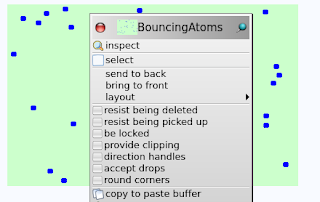
The BouncingAtomsMorph window - with and without the Morphic halo
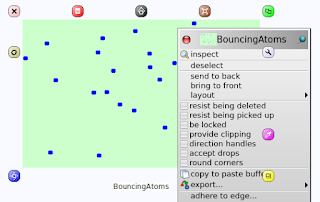
left-click the box at the left-hand end of the 'Select'/'deselect' option's row
- this brings up the 'Morphic halo' or clickable buttons to do with sub-window management
left-click the window-close Morphic button - the X at the top-left of the window
The halo *should* appear if you meta-click (i.e. middle-click) the window - but it doesn't on my Windows install of the PBE-OneClick zip (which is id-ed as Pharo-1.0 Latest update: #10517 in System | About )

The BouncingAtomsMorph window - with and without the Morphic halo

Friday, 16 October 2015
Starting again, part 2
Basic loops
Loops are high-level collection iterators, implemented as regular methods.
to:do:
to:by:do"
Transcript open.
1 to: 100 do:
[:i | Transcript show: i asString; cr ].
1 to: 100 by: 3 do: [:i | Transcript show: i asString; cr].
Iterators
The message do: is sent to a collection of objects (Array, Set, OrderedCollection), evaluating the block for each element.
e.g.
#(11 38 3 -2 10) do: [:each |Transcript show: each printString; cr]. "do for each element in the array #(11 38 3 -2 10) and print to the Transcript"
"Some other really nice iterators"
#(11 38 3 -2 10) collect: [:each | each abs]. "collect means do for each and every member ?"
#(11 38 3 -2 10) collect: [:each | each odd].
#(11 38 3 -2 10) select: [:each | each odd]. "add each member that meets the criterion to a new collection? Or to the subject of the message?"
#(11 38 3 -2 10) select: [:each | each > 10].
#(11 38 3 -2 10) reject: [:each | each > 10]. "remove each member that meets the criterion from the collection? Or creates a new collection with the subset?"
#(11 38 3 -2 10)
do: [:each | Transcript show: each printString]
separatedBy: [Transcript show: '.'].
explore
All objects understand this message. It opens an information window about the object. All it's properties.
browse
brings up the Package Browser, which is the Class Browser plus info about packages (groups of classes)
Starting again
Time to retrace my steps, so I am sure I understand code that I read later
Download the PBE-OneClick, and started my way through it
ProfStef lessons 1st, then Pharo By Example, the book
Highlight text in the workspace and Alt-p or rt-click to "print it", and the expression is evaluated, then printed to the workspace.
It stays highlighted, so it is easy to then delete or backspace
Highlight text in the workspace and Alt-d to "do it". Expression is evaluated.
Messages
Unary - one argument following an object
Binary one argument between two objects
Keyword - as many arguments as you like, each with a keyword preceding it.
Each keyword is suffixed by a colon. e.g. Gordon middleName: 'Reynolds' lastName: 'Love'.
. (full stop) completes an expression
Precedence: Unary then binary then keyword, left to right when of equal precedence
Always - even for arithmetic expressions.
Parentheses alter the precedence order
If you end an expression with ; (rather than . ), the subject of the next line is left implicit, and it will be the same as the subject of the line just ended. This is called a message cascade.
e.g.
Transcript show: 'hello'.
Transcript show: 'Smalltalk'.
Transcript cr.
"is equivalent to:"
Transcript
show: 'hello';
show: 'Smalltalk' ;
cr.
Blocks are
anonymous methods that can be
stored as variables and
executed on demand
delimited by square brackets [ ]
Here is a block that adds 2 to its argument (its argument is named x):" :x is, in effect, also the local variable.
[:x | x+2].
"We can execute a block by sending it value messages."
[:x | x+2] value: 5.
[Browser open] value.
[:x | x+2] value: 10.
[:x :y| x + y] value:3 value:5.
Sends '12' into b, which is an object which takes its input and adds 2 to it.
Conditionals - messages sent to boolean objects
Download the PBE-OneClick, and started my way through it
ProfStef lessons 1st, then Pharo By Example, the book
Highlight text in the workspace and Alt-p or rt-click to "print it", and the expression is evaluated, then printed to the workspace.
It stays highlighted, so it is easy to then delete or backspace
Highlight text in the workspace and Alt-d to "do it". Expression is evaluated.
Messages
Unary - one argument following an object
Binary one argument between two objects
Keyword - as many arguments as you like, each with a keyword preceding it.
Each keyword is suffixed by a colon. e.g. Gordon middleName: 'Reynolds' lastName: 'Love'.
. (full stop) completes an expression
Precedence: Unary then binary then keyword, left to right when of equal precedence
Always - even for arithmetic expressions.
Parentheses alter the precedence order
If you end an expression with ; (rather than . ), the subject of the next line is left implicit, and it will be the same as the subject of the line just ended. This is called a message cascade.
e.g.
Transcript show: 'hello'.
Transcript show: 'Smalltalk'.
Transcript cr.
"is equivalent to:"
Transcript
show: 'hello';
show: 'Smalltalk' ;
cr.
Blocks are
anonymous methods that can be
stored as variables and
executed on demand
delimited by square brackets [ ]
Here is a block that adds 2 to its argument (its argument is named x):" :x is, in effect, also the local variable.
[:x | x+2].
"We can execute a block by sending it value messages."
[:x | x+2] value: 5.
[Browser open] value.
[:x | x+2] value: 10.
[:x :y| x + y] value:3 value:5.
Declare a variable, enclose it in | | e.g.
|b|
Blocks can be assigned to a variable, and executed later
|b|
b := [:x | x+2].
b value: 12.
Sends '12' into b, which is an object which takes its input and adds 2 to it.
Transcripts are little workpads on the screen
Transcript open.
Conditionals - messages sent to boolean objects
3 > 10
ifTrue: [Transcript show: 'maybe there''s a bug ....']
ifFalse: [Transcript show: 'No : 3 is less than 10'].
Subscribe to:
Posts (Atom)